Send selection
Clean handoff for highlighted snippets, quotes, or code blocks with zero extra wrapper text.
{{selection}}
 Bot Courier
Independent Chrome extension · v1.1
Delivered straight to your Grok Bot
Turn highlighted text, links, or any web page into an editable draft. Press Ctrl+Shift+Y (⌘⇧Y on Mac), review the wording, and hit send yourself.

Highlight a sentence, right-click a link, or start from the page you’re reading — even inside focused iframes.
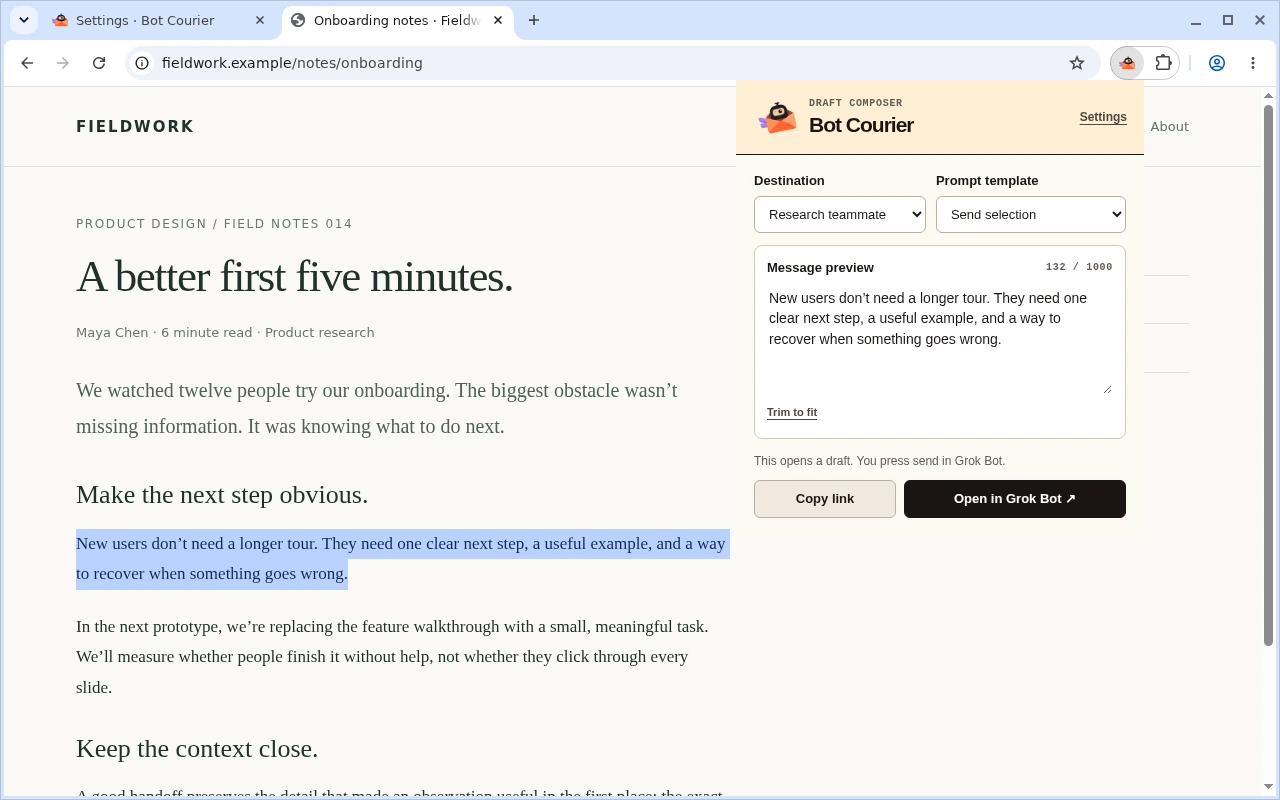
Choose a saved Bot and prompt template. Edit the preview in the toolbar popup or hit ⌘↵ / Ctrl+↵.
Open the draft via Grok Bot’s web handoff or desktop deep link. Nothing posts until you review and send it.
Fig. 02 / Inside Chrome
Edit your message live with a 1,000-character counter, switch between saved Grok Bots, or copy the deep link with one click.
{{selection}} · {{url}} · {{title}}
Clean handoff for highlighted snippets, quotes, or code blocks with zero extra wrapper text.
{{selection}}
Auto-selected when nothing is highlighted so a single click summarizes the active article.
{{title}} {{url}} {{selection}}
Send a claim, paper, or snippet to your research teammate Bot with the source URL attached.
{{selection}} {{url}}
Forward an error trace or GitHub issue snippet straight into your coding Bot’s composer.
{{selection}} Source: {{url}}
Distill docs, release notes, or threads into concrete next steps and key takeaways.
{{title}} {{url}} {{selection}}
Prompt your Bot to fact-check the main assertions on a page and flag missing evidence.
{{selection}} {{url}}
Bot Courier has no backend server, no analytics, and no persistent content scripts. It uses activeTab only at the moment you invoke it.
Web pages can embed invisible Unicode Tag characters (U+E0000) or BiDi overrides that previews hide. Bot Courier strips them and alerts you.
Before populating {{url}}, Bot Courier removes #fragments, marketing trackers (utm_*, fbclid, gclid), and auth-like keys (token, api_key, secret).
Links only populate the Grok Bot draft box within its 1,000-character / 2,048-byte limits. Long selections trim cleanly before your prompt or URL.
No. Bot Courier works immediately with your Primary Grok Bot without any setup, account, or API key. If you want to route prompts to specific named Bots, just paste their Bot ID or share link in Settings.
Never. Both the web handoff and the grokbot:// desktop link only fill the message draft in Grok Bot. You always review and press Send yourself.
Web link (recommended) works everywhere via Grok Bot’s official handoff page. Switch to App link in Settings if you have the Grok Bot desktop app installed and want your browser to trigger the local grokbot:// handler directly.
Yes. Bot Courier defaults to Ctrl+Shift+Y (Cmd+Shift+Y on Mac). You can customize it anytime at chrome://extensions/shortcuts. Inside the draft box, press Cmd+Enter or Ctrl+Enter to open in Grok Bot.
No. Bot Courier is an independent, unofficial Chrome extension built to complement Grok Bot (x.ai/bot).
Free on the Chrome Web Store
Install Bot Courier, highlight any passage, and press Cmd+Shift+Y.